> ## Documentation Index
> Fetch the complete documentation index at: https://docs.patchwork.dev/llms.txt
> Use this file to discover all available pages before exploring further.
# Introduction
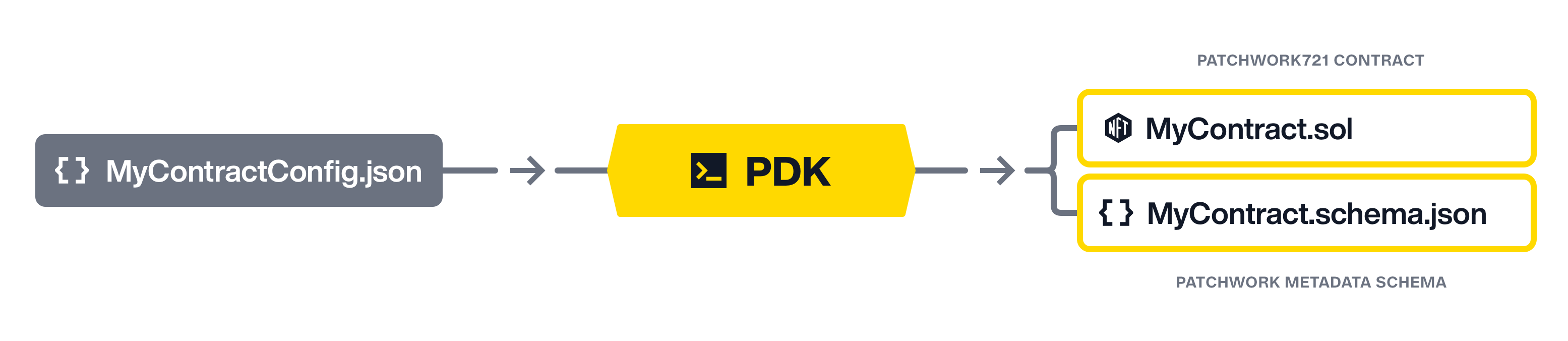
> The Patchwork Development Kit provides a toolset for defining onchain metadata schemas and generating Patchwork-compatible contracts. Define schemas in JSON and use the PDK tool to validate and generate solidity.
## Workflow
1. Define a contract configuration in JSON, adding the features and metadata fields your app requires.
2. Run the PDK contract generator to convert the JSON into a Solidity contract.
3. Customize your solidity contract by adding your own custom logic.
4. Deploy to any EVM-compatible chain [where Patchwork Protocol is deployed](/protocol/info/networks).
## Installing
In a git repository root directory, perform the following steps to prepare a project:
Foundry is a smart contract development toolchain. You can install it by following the instructions at [Foundry's installation guide](https://book.getfoundry.sh/getting-started/installation).
```shell
forge install
```
```shell
forge install runic-inc/patchwork
```
```shell
forge install openzeppelin/openzeppelin-contracts
```
In project directory, create the file `remappings.txt`
```
@openzeppelin/=lib/openzeppelin-contracts/
@patchwork/=lib/patchwork/src/
forge-std/=lib/forge-std/src/
lib/=lib/
```
Option 1 - Local project installation (recommended for npm/js projects)
```shell
npm i @patchworkdev/pdk
```
Option 2 - Global binary installation
```shell
npm i -g @patchworkdev/pdk
```